A Fether subscription is automatically canceled when you uninstall the app from your Shopify store or permanently close your e-store. As outlined in our Support Policy, our support team is unable to cancel subscriptions on your behalf.
How to Uninstall the App from Shopify
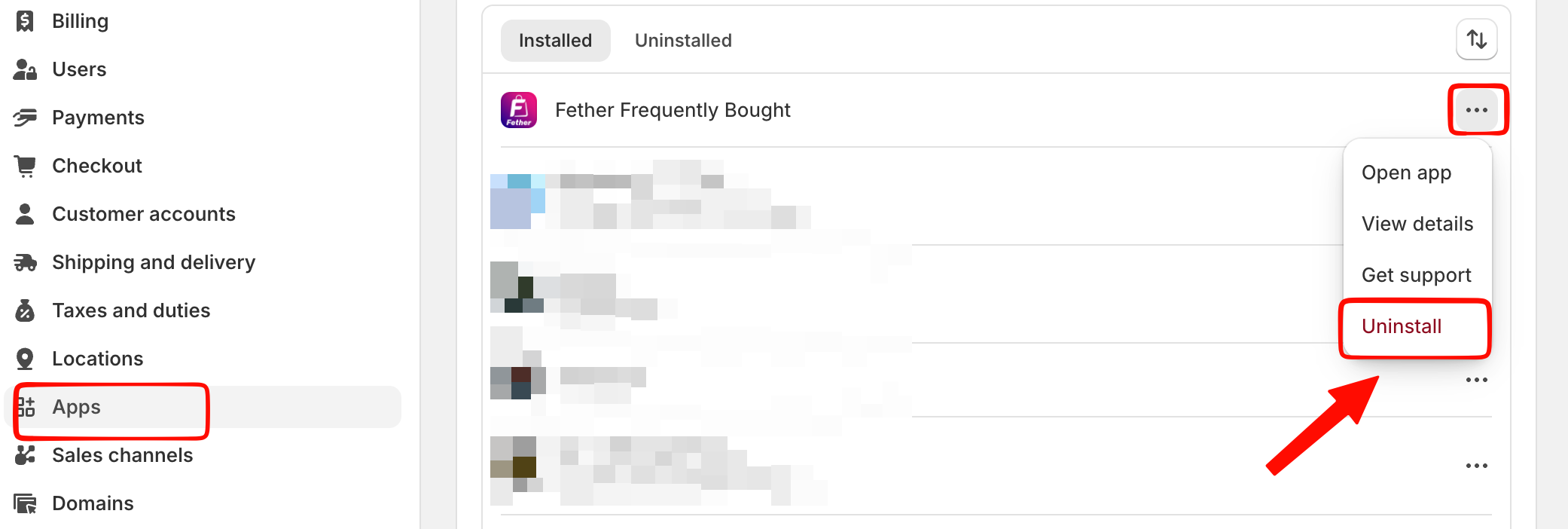
To uninstall/remove an app from your Shopify store, please follow these below steps:
Going through your Shopify admin > Settings > Apps
Locate the app you want to uninstall.
Click the Uninstall button.
Note:
Shopify will still charge the current 30-day billing cycle if the charge is already started, even if you've already uninstalled the app.
If you want to pause your store for some time, please help to uninstall our app as well, in order to avoid AUTO-charging when your store moves to the "Pause and Build" plan.
Refer to this Shopify article about how to pause, or close your store.
If you change your mind later on or are ready to re-publish your store (after uninstalling), you can always re-subscribe to Fether apps at any time. Just install the app, and all your data will be synced back.
We will wipe your data after uninstalling for 3 months for Paid plan users, and after 45 days for Free plan users. This will perform automatically, so make sure to re-install the app before that time.
If you have any further questions, please contact us for further support via our email at support@fether.app.
Was this article helpful?
That’s Great!
Thank you for your feedback
Sorry! We couldn't be helpful
Thank you for your feedback
Feedback sent
We appreciate your effort and will try to fix the article